



How to Use the Drawer (App List)
UPDATE: 2026.02.02
+HOME is an Android customization app that allows you to personalize your smartphone in your own way. This article provides a detailed introduction to how to use the drawer (app list) for those who are considering starting with +HOME.
What is the Drawer (App List)?
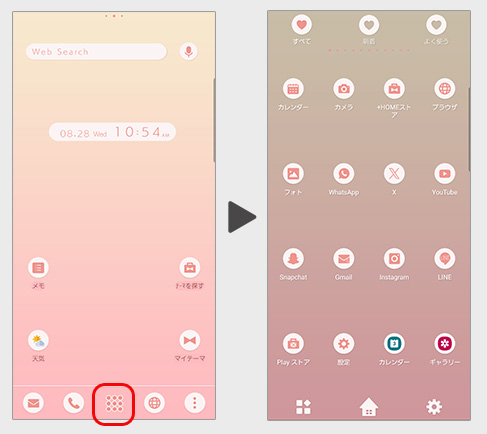
It is a page where you can see a list of all installed apps (hereafter referred to as the 'drawer').
It will appear when you swipe up on the home screen or press the button in the center of the dock bar.
About the Button:
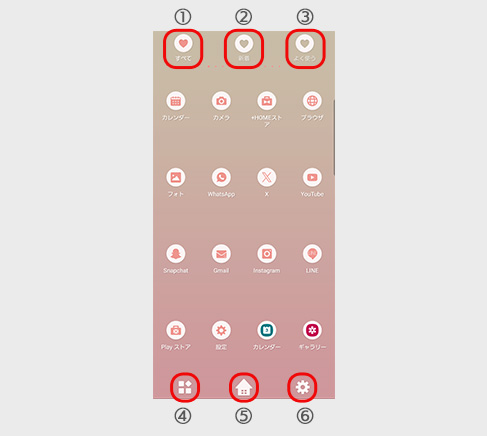
① All
All installed apps will be displayed.
② New
Recently installed apps will be shown.
③ Frequent
Apps that you use frequently will be displayed.
④ Sort & Uninstall Button
You can sort the apps in the drawer and uninstall them.
⑤ Home Button
You can return to the home screen.
⑥ Settings
You can configure various settings for the drawer.
How to Add an Icon to the Home Screen
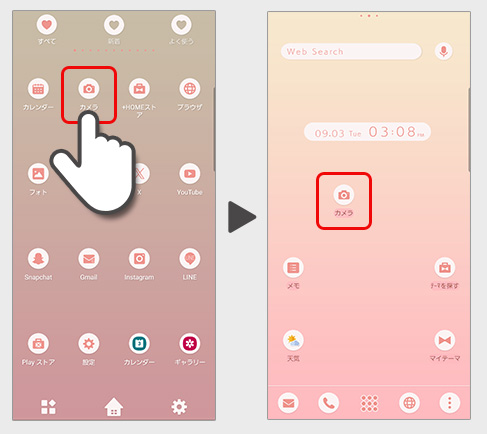
Press and hold the icon and move it to switch to the home screen.
You can place an icon on the home screen
How to Sort Apps in the Drawer
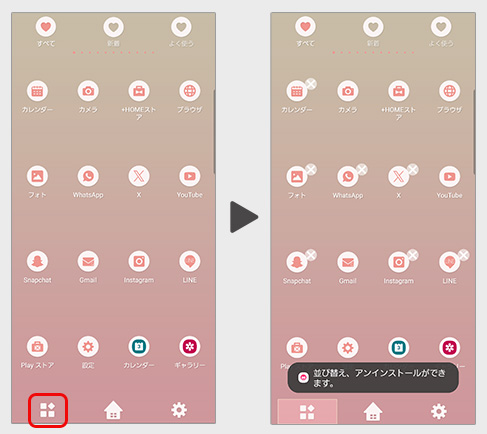
1. Tap the icon located at the bottom left of the drawer.
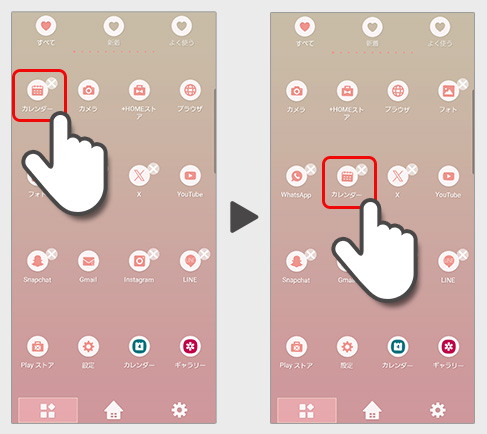
2. Long-press the app you want to move, then drag it to the desired location.
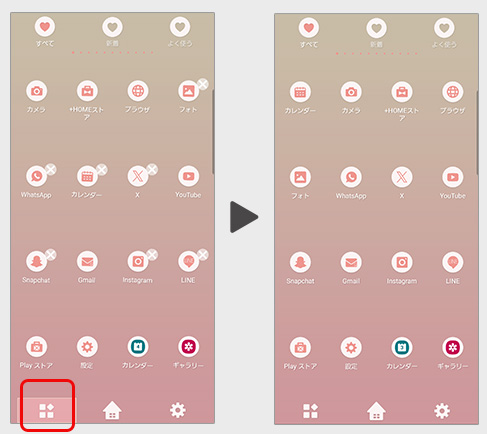
3. Once you’ve finished moving the apps, tap the icon at the bottom left of the drawer again to return to the main drawer.
List of How to Use +HOME
-
About the Home Screen
-
Let's Change the Theme
-
How to Use the Drawer (App List)
-
Mastering the Home Screen
-
About the Iconpacks
-
How to Change Home Screen Icons Individually
-
How to Change Home Screen Icons All at Once
-
How to Change Home Screen Icons with Your Favorite Images
-
How to change home screen icon size
+HOME Special Features List.
-
🌕 Moon Viewing Theme Special 🌕
Enjoy a beautiful moon viewing on your smartphone! Create a fantastical and romantic night with the Full Moon theme 🌕
-
🧋 Tapioca Special 🧋
Cute bears and cats drinking tapioca drinks are waiting for your smartphone! A handsome pop design to add color to your phone!
-
🌆 Nostalgic Theme Special Feature 🌆
Smartphone scenes bathed in twilight. Get your hands on fantastical displays woven with nostalgic light and shadow through sunset and night sky themes right now🌆
-
🌱 Featured fresh new greenery 🌱
Dye your phone with a new green color! Peace of mind with a green dress-up theme that's easy on the eyes and relaxing... ♪
-
🐠 Summer Fish Theme Special Feature 🐠
Cool summer fish are now available on your smartphone! Refresh your mood with summer-themed fish such as goldfish🐠✨
-
🐩 White and Cute Animal Theme Special Feature 🐰
All-white healing comes together on your phone! Fill your screen with adorable snow-like animal themes like dogs,rabbits,and Siberian longtails!🐰
-
💖 Popular Girls' Fashion Theme Special 💖
Make your smartphone stylish! Trendy and cute wallpaper customization feature 💖
-
◻️ Featured Simple Themes for Ease of Use ◻️
Experience functional beauty on your smartphone! A curated collection of sleek minimalist designs for Nova Launcher users ◻️
-
😸 Cute Animals and Food Theme Special 🍜
Feel cozy on your smartphone screen! Enjoy heartwarming moments with animals munching on food 😋
-
🌼 Floral Print Special Feature 🌼
Get your hands on a stylish floral dress-up theme now! Adorn your home screen with delicate flower motifs for a gorgeous and sophisticated look🌼
-
🏝️ Tropical Theme Special Feature 🏝️
Bring on summer! Get that tropical resort vibe with tropical smartphone skins🏝️
-
❄️ Snowflake Theme Special Feature ❄️
Winter art sparkles on your smartphone! Create a fantastical, crystal-clear display with a snowflake theme featuring intricate ice emblems.❄️
-
✈️ Overseas Travel Specials ✈️
Enrich your mind with exotic landscapes! Decorate your phone's Kisekae with wallpaper themes for international travel!
-
🏯 The Kanji Archive 🏯
Upgrade your aesthetic with our massive collection of Kanji wallpapers. Whether you’re looking for bold brushstrokes or sleek modern typography, we’ve gathered the most iconic Japanese symbols in one place.
-
🌃 Eye-friendly dark mode feature 🌌
A collection of practical dark mode themes with a black background for the entire screen that are easy on the eyes and conserve battery power 👀✨
-
🌸 Pink Theme Special 🌸
Make your smartphone more cute with pink Kisekae! Introducing a variety of Kisekae themes from elegant to pop!
-
🍁 Autumn Foliage Theme Special 2025 🍁
Enjoy autumn foliage on your smartphone! Dress up your device with themes featuring breathtaking views dyed red, yellow, and every shade in between—all yours to savor! 🍁
-
🍣 Sushi and Japanese Sweets Theme Feature 🍵
Add delicious magic to your smartphone screen! With this Japanese gourmet design theme, enjoy a thrilling visual experience that makes your stomach rumble every time you look at it🍣😋
-
💐 Nemophila and Spring Flowers Special Feature 💐
Capture the blue carpet blanketing the hills on your smartphone! With themes featuring nemophila and vibrant flowers, fill your screen with sweeping vistas that seem to merge with the sky and the fresh breath of spring 💐
-
🔴 Red Theme Special Feature 🔴
Show off your passion with fiery red on your smartphone! Brighten your screen with a custom theme and express your personality❣️