



How to Change Home Screen Icons with Your Favorite Images
UPDATE: 2025.03.19
+HOME is an Android customization app that allows you to personalize your smartphone to your liking.
This article explains how to change the icons on your home screen to your favorite images.
▼ How to Change Icons to Your Favorite Images
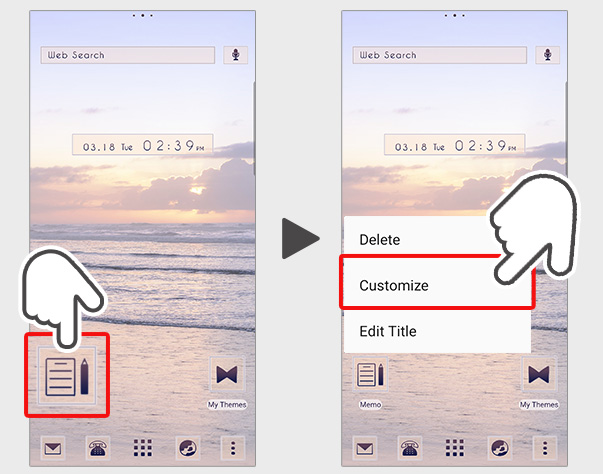
1. Long-press the icon you want to customize on the home screen.
2. Select 'Customize' from the menu that appears.
3. Select 'Gallery' from the menu that appears.
4. Photos on your device will be displayed.
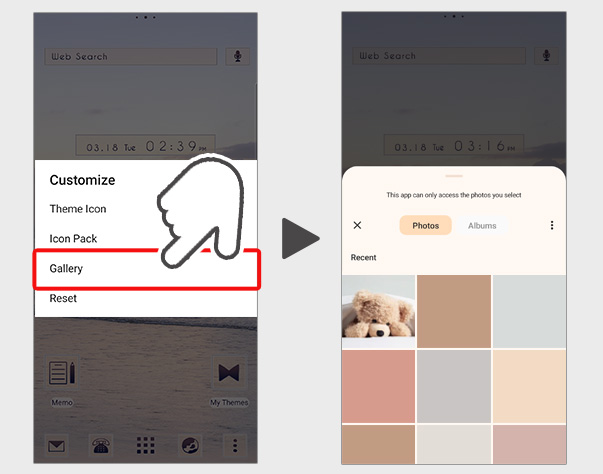
5. Select the photo you want to set as the icon, and the customization is complete! ♪
* Please prepare an image that has been cropped to a square.
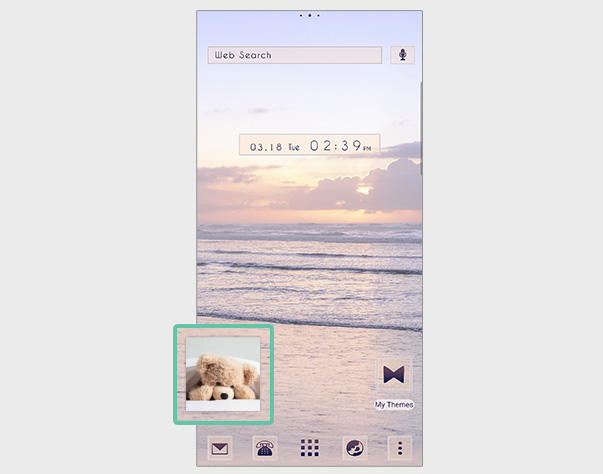
Introducing the themes I used for customization♪
Morning Glow


A beautiful, calming theme of a serene morning sea.

List of How to Use +HOME
-
About the Home Screen
-
Let's Change the Theme
-
How to Use the Drawer (App List)
-
Mastering the Home Screen
-
About the Iconpacks
-
How to Change Home Screen Icons Individually
-
How to Change Home Screen Icons All at Once
-
How to Change Home Screen Icons with Your Favorite Images
-
How to change home screen icon size
+HOME Special Features List.
-
🌞 Fresh sky special. 🌞
A special feature of smartphone kisekae with a refreshing sky theme! Let's enjoy a comfortable everyday life with soothing wallpapers♪
-
✨ Cool Summer Special Feature ✨
Colorful summer items welcome you! Express the season with smartphone customization✨
-
◻️ Featured Simple Themes for Ease of Use ◻️
Experience functional beauty on your smartphone! A curated collection of sleek minimalist designs for Nova Launcher users ◻️
-
☕ Alice in Wonderland Special ♣
Alice in Wonderland smartphone dress-up brings fantasy into your daily life! Full of unique designs!
-
📱 Home Screen Refugees: Find Your Next Theme 📱
Are you worried that your smartphone life is on hold because ""the app you’ve loved for years is shutting down...""?We, 「+HOME」, are here to fully inherit the joy of instant, complete home screen makeovers.
-
⛱️ Starry Sky Theme Special ⛱️
Transform your phone into a starry night universe with customized space aesthetic themes right now!:star:️
-
🍓 Stylish Strawberry 🍓
Featuring strawberry motif designs that make your phone look stylish! Add charm with cute designs!
-
🥰 Valentine's Theme Special 2026 🍫
Add a touch of love magic to your smartphone screen! Start a happy digital life with Valentine's Day design themes that heighten your feelings for loved ones and treat yourself to a special mood ♥️
-
🤍 Clean white color feature 🤍
Pure white brilliance! White roses, clouds, and simple designs shine through in a variety of stylish and easy themes 🤍
-
💛 Pastel Yellow Theme Special 💛
Give your device a fresh new look! Enjoy a happy home screen every day with this refreshing pastel yellow theme 💛
-
🎃 Halloween Theme 2025 Special Feature 🎃
Enjoy Halloween on your smartphone! Dress up your screen with pumpkin and ghost themes for a uniquely spooky display🎃
-
♥️ Pop Pattern Theme Special ♥️
A charming worldview that brightens every day! Transform your smartphone into the ultimate cute and stylish sanctuary with this dress-up theme featuring dancing hearts, cats, and flowers ♥️
-
🌕 Enjoying the Moon Viewing: Full Moon Theme Special 🌕
Enjoy moon viewing right on your smartphone screen! Relax with rabbit and pampas grass themes 🌕🐰
-
🎀 Cute Ribbon Theme Special 🎀
Ribbon motifs add cuteness to your smartphone! Be sure to check out our stylish and cute Kisekae feature 💝
-
🎐 Special Feature on Summer in Japan 🎐
Sparkling fireworks and cool waters! Enjoy the Japanese summer theme on your smartphone and immerse yourself in the Japanese spirit.
-
🐱 Special Clip art of cat 🐱
Let's dress up your smartphone with cute cat illustrations! Find your favorite cat!
-
📱 Solution: The ""Next"" Launcher Feature 📱
Worried about your favorite launcher being discontinued? The Japanese-made Android launcher, ""+HOME,"" offers a safe and easy way to fully customize your screen with fast, smooth operation!
-
🍓 Cute Strawberry Special 🍓
Featuring sweet and sour and cute strawberry designs! A variety of pop and adorable themes are available!
-
🍉 Watermelon Theme Special 🍉
Turn your phone into a watermelon! Refresh your mood with this summery green and red theme 🍉